If you run a small business, you've probably felt the same pressure from two sides. Customers still expect fast replies, clean handoffs, and accurate paperwork, while your team is already stretched across sales, ops, billing, and admin. That's the exact gap where AI automation for small business is getting real traction, not as a shiny experiment, but as a way to stop losing nights and weekends to repetitive work.
The shift is visible in the numbers. JPMorgan Chase's Institute reported that approximately 17.7% of firms had adopted AI by the end of 2025, and U.S. Chamber of Commerce small-business data cited in industry coverage shows generative AI use rising from 23% in 2023 to 40% in 2024 and 58% in 2025 (JPMorgan Chase Institute). That kind of move tells you this is no longer a side conversation about tools, it's becoming standard operating infrastructure for a meaningful share of firms.
Table of Contents
- Why Small Businesses Are Suddenly Buying AI Automation
- What AI Automation Actually Means for a Small Business
- Five Quick-Win AI Automation Projects You Can Ship This Quarter
- Pricing Templates That Land Small Business AI Clients
- Real ROI Math for AI Automation in Small Business Workflows
- What Breaks After Deployment and How to Prevent It
- A 90-Day Plan to Launch or Sell AI Automation for Small Business
- Frequently Asked Questions About AI Automation for Small Business
Why Small Businesses Are Suddenly Buying AI Automation
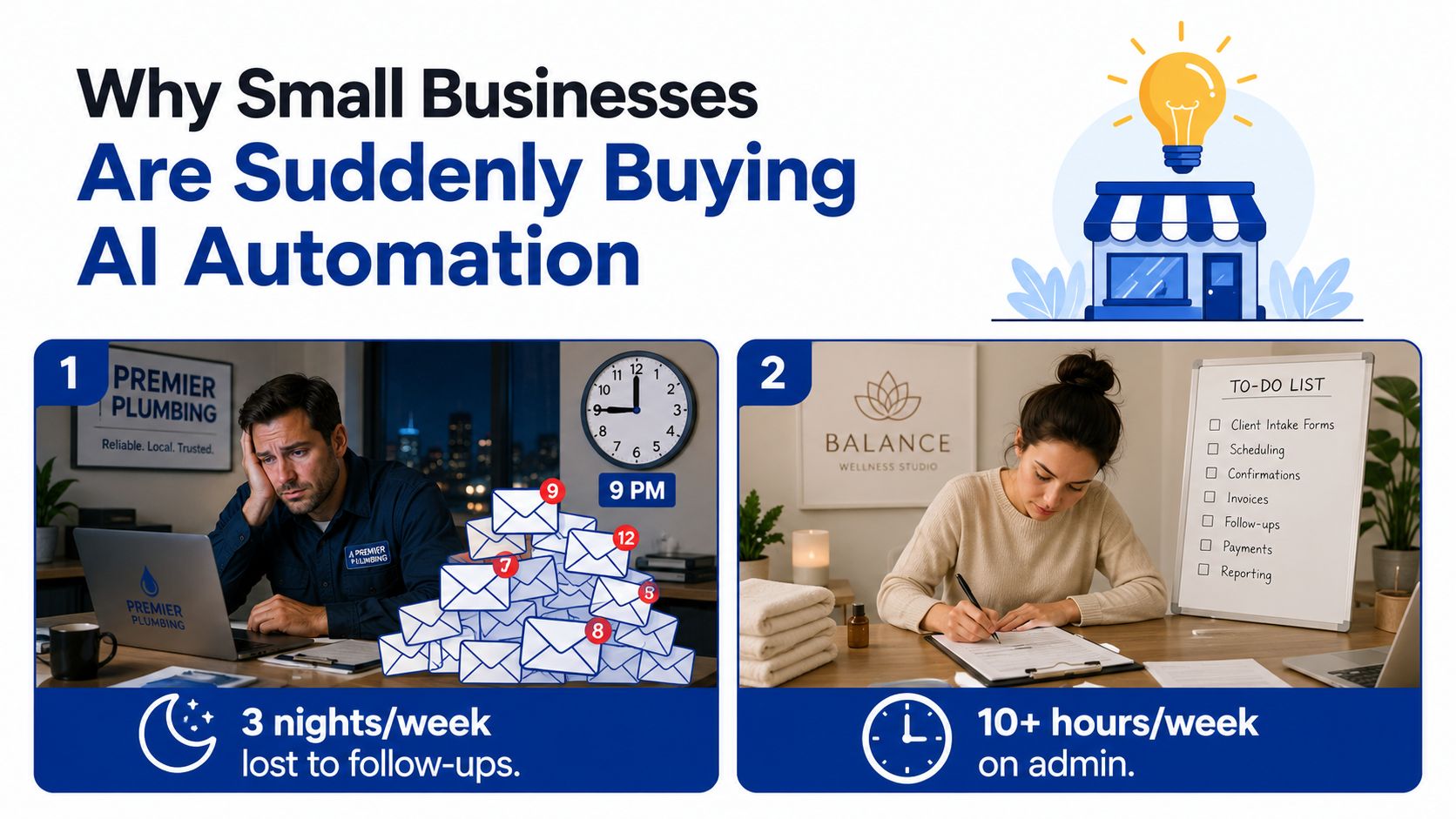
A 12-person plumbing company doesn't need a lecture about digital transformation. It needs someone to stop three nights a week from disappearing into follow-up emails, quote reminders, and scheduling churn. A wellness studio owner copying intake forms by hand doesn't care whether the model is elegant, she cares that her front desk keeps getting buried after hours.
That's why demand has sharpened so fast. Owners are hitting a hard ceiling on hours, and they're doing it while the cost of usable AI has dropped enough to make workflow experiments practical. The result is a buyer who's no longer asking for novelty, but for relief.
Three pressures are pushing the same direction
The first pressure is technical. Foundation models now plug into everyday systems with enough reliability to handle summaries, classification, drafting, and routing without a custom R&D team. The second is behavioral. Small businesses got used to cloud apps, online booking, digital invoicing, and remote collaboration, so back-office automation doesn't feel alien anymore.
The third pressure is operational. Owners are expected to do more with the same headcount, which changes the buying conversation from “Should we modernize?” to “What do we stop doing manually first?” That's why the fastest adopters aren't always the most tech-forward firms, they're the ones with the worst repetitive bottlenecks.
Practical rule: if a task shows up every day, depends on readable text, and causes someone to retype the same information twice, it belongs on the shortlist.
The important shift is this. The buyer now understands that the problem is not “using AI” in the abstract, it's removing labor from a workflow that already exists. Firms that act now get to standardize the process while the market is still figuring it out. Firms that wait another quarter usually end up buying the same capability later, but under more pressure and with less room to design it properly.
What AI Automation Actually Means for a Small Business
Think of AI automation as a junior operations hire who can read everything in the business, never sleeps, and follows the checklist exactly as written. The catch is that this hire doesn't improvise well. If the checklist is vague, the output is vague too.
In practical terms, AI automation is software that combines a language model with ordinary automation to run a recurring workflow from trigger to action with an exception path when something looks wrong. That makes it different from a chatbot that only talks, and different from a simple Zapier chain that just passes fields from one app to another without judgment.
The four parts that matter
Every useful workflow has a trigger, which starts it. That might be a new lead form, a completed job, a received invoice, or an incoming email.
Then comes the model step, where the system reads, summarizes, classifies, or drafts. After that, an action pushes the result into a CRM, inbox, spreadsheet, scheduling tool, or accounting app. Finally, an exception path catches unclear, risky, or messy cases and sends them to a human.
If you can't describe the trigger, the model step, the action, and the exception path, you don't have an automation yet. You have a demo.
The most common categories are easy to recognize once you know what to look for. Small businesses automate lead handling, scheduling, document processing, customer communication, and reporting. Those are the workflows where text, repetition, and handoffs collide often enough to justify design work.
The difference between a toy and a real system is control. A toy drafts an email. A real automation reads the incoming context, decides what category it belongs to, writes the draft, routes edge cases for review, and logs the outcome. That is the mental model worth selling, buying, and building around.
Five Quick-Win AI Automation Projects You Can Ship This Quarter
The fastest wins usually come from replacing a workflow people already hate, not from inventing a brand-new process. A consultant who knows how to scope well can ship these in two to six weeks, then use the first result to justify the next one.
The short list that closes most often
| Project | Workflow Replaced | Tool Stack | Build Hours | Monthly Hours Saved |
|---|---|---|---|---|
| Inbound lead enrichment and routing | Manual lead review, CRM entry, and assignment | Form tool, LLM step, CRM, Slack or email alerts | 12 to 18 | 8 to 20 |
| After-hours call and email triage | Inbox scanning and first-pass replies | Shared inbox, transcription or email parser, LLM, ticketing or CRM | 10 to 16 | 10 to 25 |
| Invoice and receipt OCR with bookkeeper exports | Hand-keyed expense entry and file sorting | OCR, document parser, spreadsheet or accounting export | 14 to 24 | 6 to 18 |
| Review and testimonial request automation | Manual post-job follow-up | Job-completion trigger, email tool, review link flow, CRM update | 8 to 12 | 4 to 10 |
| Weekly owner dashboard from raw platform data | Manual spreadsheet updates and status checks | API connectors, spreadsheet, LLM summary, dashboard email | 16 to 28 | 5 to 15 |
The numbers above are practical ranges, not promises. A lead-routing workflow usually pays off fastest because it touches revenue and keeps the sales inbox from becoming a graveyard of missed replies. An OCR workflow tends to look simple until you meet messy documents, which is why it's best sold with a pilot and clear exception handling.
What to build first
If the client lives in the inbox, start with triage. If the client lives in the field, start with post-job follow-up. If the client lives in accounting, start with invoice extraction. If they live in dashboards, start with a weekly summary that stops them from asking their team for status updates.
One useful next step is to map candidate workflows against build effort and clarity of data, then compare them to the delivery patterns in this AI agents and workflows training path. The strongest first project is usually the one where the owner can point to the exact pain in under ten seconds.
The consultant's job is to sell the narrowest version that still proves value. That means one workflow, one owner, one exception path, one acceptance rule. Broad bundles feel impressive in a proposal, but they're much harder to ship cleanly.
Pricing Templates That Land Small Business AI Clients
Most small-business AI work closes when the client can see a clean boundary between build, integration, and ongoing support. The wrong pricing model makes that boundary fuzzy, which is how scope creep eats margin before the first month is over. The right model makes the business case obvious and the delivery risk manageable.
Three pricing models that actually work
A fixed setup fee is the easiest to sell when the workflow is clear and the scope is bounded. It usually covers discovery, build, testing, and deployment. For a 5 to 25 person business, that often lands in the $2,500 to $15,000 range, depending on how many systems it touches and how messy the data is.
A monthly retainer fits ongoing monitoring, prompt adjustments, exception review, and light improvements. In practice, that often sits between $400 and $2,500 per month, with higher retainers tied to more integrations and more operational risk. A clean service agreement matters here, because the client is buying continuity, not a one-time install.
Outcome-based pricing works when the workflow has a measurable result, like hours saved or tickets deflected. It can be attractive, but only if the baseline is clear and the client agrees on how the result will be measured. I've seen this structure close best when it's paired with a setup fee and a short pilot period, not used as the entire contract.
Contract rule: define who owns the data, who can retrain prompts or workflows, and how either side exits without breaking operations.
A hybrid offer often wins. The pattern is simple, a setup fee plus a 90-day pilot retainer, then a steady monthly if the client sees value and wants the system watched. That structure reduces buyer risk and gives the consultant enough cash flow to support the work.
If you want a sales process that doesn't lean on vague enthusiasm, the positioning and closing material in this sales training resource is the kind of framework that helps. The point isn't to talk harder, it's to scope tighter and sell a deliverable the owner can inspect.
| Pricing Model | Typical Range (USD) | Best Fit Client | Consultant Risk | Cash Flow Profile |
|---|---|---|---|---|
| Fixed setup fee | $2,500 to $15,000 | Clear workflow, known systems, simple approval chain | Medium, mostly scope creep | Front-loaded cash |
| Monthly retainer | $400 to $2,500/month | Client wants monitoring, tuning, and ongoing support | Lower if scope is narrow | Recurring revenue |
| Outcome-based | Variable, tied to hours or tickets | Client trusts the baseline and wants shared upside | Higher if measurement is fuzzy | Back-loaded, performance-linked |
Real ROI Math for AI Automation in Small Business Workflows
The cleanest ROI proposals don't start with AI. They start with labor, exception handling, and recurring friction. If the owner can't see how time turns into money, they won't trust the pitch, no matter how polished the demo looks.
Scenario A, a services firm
A 12-person professional services firm automates lead intake and proposal drafting. The setup cost is $9,400, and monthly tooling costs $1,200. The workflow reclaims 38 hours per month, and the fully loaded labor cost is $65 per hour.
The math is straightforward. Monthly gross savings are 38 x $65 = $2,470. Subtract the recurring tooling cost, and the net monthly savings become $1,270. Divide the setup cost by the net monthly savings, and the payback lands at roughly 7.4 months.
That's the formula I'd show in a proposal, because it's defensible and easy to audit:
Payback months = setup cost ÷ (monthly hours saved x loaded hourly cost – recurring tooling cost)
Scenario B, a smaller e-commerce operator
A 4-person e-commerce operator automates customer email triage and inventory alerts. The setup cost is $3,800, and monthly tooling costs $450. The workflow saves 22 hours per month, and the loaded labor cost is $42 per hour.
That gives gross monthly savings of $924. After tooling, the net monthly savings are $474. The setup cost pays back in just over 8 months, which is still a reasonable position for a lean operator if the workflow also improves response speed and reduces missed issues.
| Metric | Scenario A, 12-Person Services Firm | Scenario B, 4-Person E-commerce Operator |
|---|---|---|
| Setup cost | $9,400 | $3,800 |
| Monthly tooling cost | $1,200 | $450 |
| Monthly hours reclaimed | 38 | 22 |
| Loaded hourly cost | $65 | $42 |
| Gross monthly savings | $2,470 | $924 |
| Net monthly savings | $1,270 | $474 |
| Payback period | 7.4 months | 8 months plus |
| Annualized view | Positive if workflow stays stable | Positive if error handling stays tight |
The inputs consultants often fudge are the ones that break trust later. Use the true loaded labor cost, not a guess. Include an error buffer, usually 10 to 15% of expected labor in messy workflows, because edge cases always show up once the client starts using the system every day. And don't assume every saved hour turns into immediate cash, because some of that time gets reinvested into better response times or more sales activity.
What Breaks After Deployment and How to Prevent It
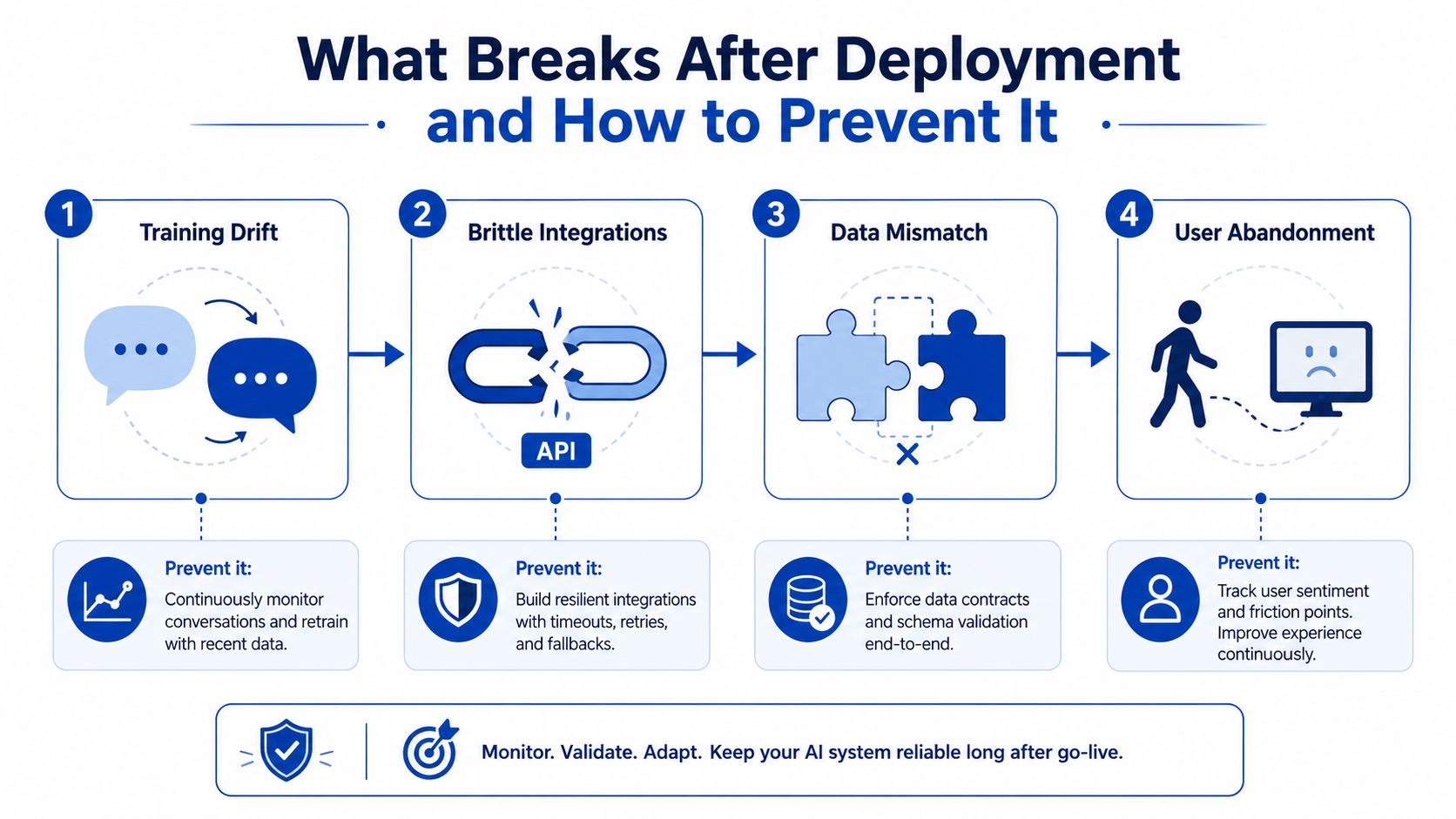
The demo usually works. The failure happens later, when the customer language changes, the app vendor updates an API, or a draft reply gets sent without the right review. That's the part most buyers never see, and it's why post-launch support needs to be priced in from day one.
The four failure modes that matter most
Training drift shows up when customers stop using the same language they used during the pilot. Your model starts classifying things incorrectly because the examples it learned from no longer match the live inbox. The fix is weekly sampling and prompt or workflow updates based on real cases.
Brittle integrations happen when a SaaS tool changes a field, an endpoint, or a permission rule. The workflow keeps running, but data starts landing in the wrong place or stops syncing altogether. Middleware checks and schema validation catch that before the client notices.
Privacy incidents happen when sensitive data gets sent into a model path without redaction or governance. The answer is not a hand-wave about vendor trust, it's a redaction layer and a clear rule for what can and can't enter the prompt.
Silent error compounding is the most expensive one. A small percentage of wrong summaries, misrouted leads, or bad CRM fields can contaminate downstream work until the owner loses confidence in the whole system. Human review on any output that touches a customer or a number is the simplest defense.
Maintenance is not an afterthought. If you don't price for it, the client will still need it, and the project will drift until everyone blames the tool.
A practical maintenance budget usually sits around 15 to 25% of build cost when the workflow is business-critical and touched by multiple systems. That's not overhead, it's the price of keeping the automation dependable enough to keep billing against. For teams that need a delivery framework for controls and operating rules, this SOP resource fits naturally into the same discussion.
A 90-Day Plan to Launch or Sell AI Automation for Small Business
The fastest way to get traction is to treat this like a delivery business, not a side project. The next 90 days should produce proof, a reusable asset base, and a clear offer that a buyer can understand in one sales call.
The quarterly sequence
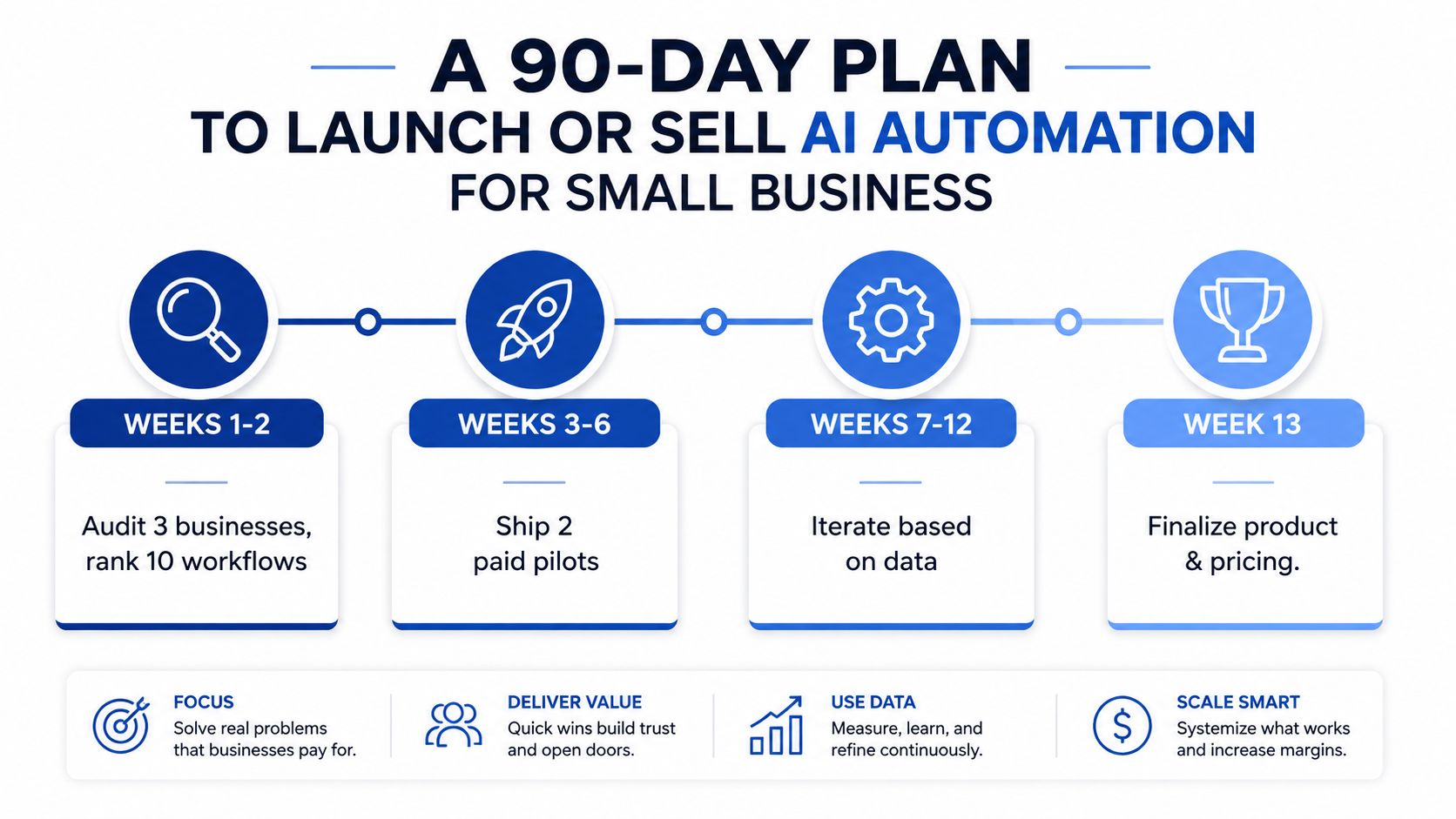
Weeks 1 to 2, audit three target businesses and rank ten workflows by hours saved and build effort. The deliverable here is a short audit memo, a workflow map, and a prioritized build list with one-line ROI logic for each candidate.
Weeks 3 to 6, ship two paid pilots using the setup-fee-plus-retainer structure. A contractor can handle scraping or tricky API integrations, while the founder should run the scoping call, define the acceptance criteria, and own the client conversation.
Weeks 7 to 10, build a reusable component library. That means prompts, connectors, intake templates, exception rules, and reusable CRM logic. The point is to cut each new build down sharply so the next client starts with parts, not a blank page.
Weeks 11 to 12, publish a landing page, one concrete case study, and a diagnostic offer that gives the owner a low-risk entry point. The deliverable should show what workflow was mapped, what was automated, what still needs a human, and what the client can expect in the first month.
Keep the offer narrow. A tight diagnostic beats a vague “AI transformation” pitch every time.
The milestone that matters most is not launch day, it's repeatability. By the end of the quarter, you should be able to show a prospect a workflow map, a pricing template, a sample exception path, and a delivery timeline. That is enough to move from “interesting idea” to “hireable operator.”
Frequently Asked Questions About AI Automation for Small Business
The first engagement should be scoped around one workflow, one owner, and one business outcome. If the client wants three automations at once, split them into a paid discovery plus separate builds so scope doesn't swallow the margin.
A monthly retainer should cover monitoring, exception review, prompt or rule updates, and minor integration fixes. If you leave those items out, the work still happens, but it happens as unpaid support.
OCR-based automations are reliable enough when the input format is consistent or when the workflow has a human review step for messy documents. If the documents are chaotic, sell the extraction as an assisted process, not a fully hands-off one.
Outcome-based fees work best when the baseline is observable and the measurement is simple. If hours saved vary month to month, define the metric as a range, then use a floor plus a bonus rather than pretending the number will stay perfectly stable.
For customer data, use a clause that says the client owns the data, the consultant only uses it to operate the workflow, and sensitive fields must be redacted before prompt submission when possible. If a model produces a customer-facing reply, route it through a human sign-off until the error rate is proven acceptable.
SeanNoCode teaches consultants and small agencies how to package AI audits, scope the work, and close the first deal without guessing at pricing or delivery. If you want templates for proposals, scopes, and client handoff, visit SeanNoCode and use the same playbook to turn automation skills into a sellable service.